


Semua produk
-
Microwave sensor gerak
-
Dimmable Motion Sensor
-
Sensor Detektor Kehadiran
-
Dimmable LED driver
-
Sensor Gerak Pir
-
Sensor Fungsi Mati
-
Driver Sensor
-
Sensor Daylight
-
Sensor gerak DC
-
Sensor Gerak UL
-
DALI Motion Sensor
-
Sensor Gerak Nirkabel
-
Driver LED DALI2.0 Dimmable
-
Dali Dimmable LED Driver
-
1-10v Dimmable LED Driver
-
TRIAC Dimmable Led Driver
-
Driver Darurat LED
-
Pengemudi IOT
Kontak Person :
June Zhao
Detektor hunian 24GHz dengan kontak NO dan kontak NC dengan input AC
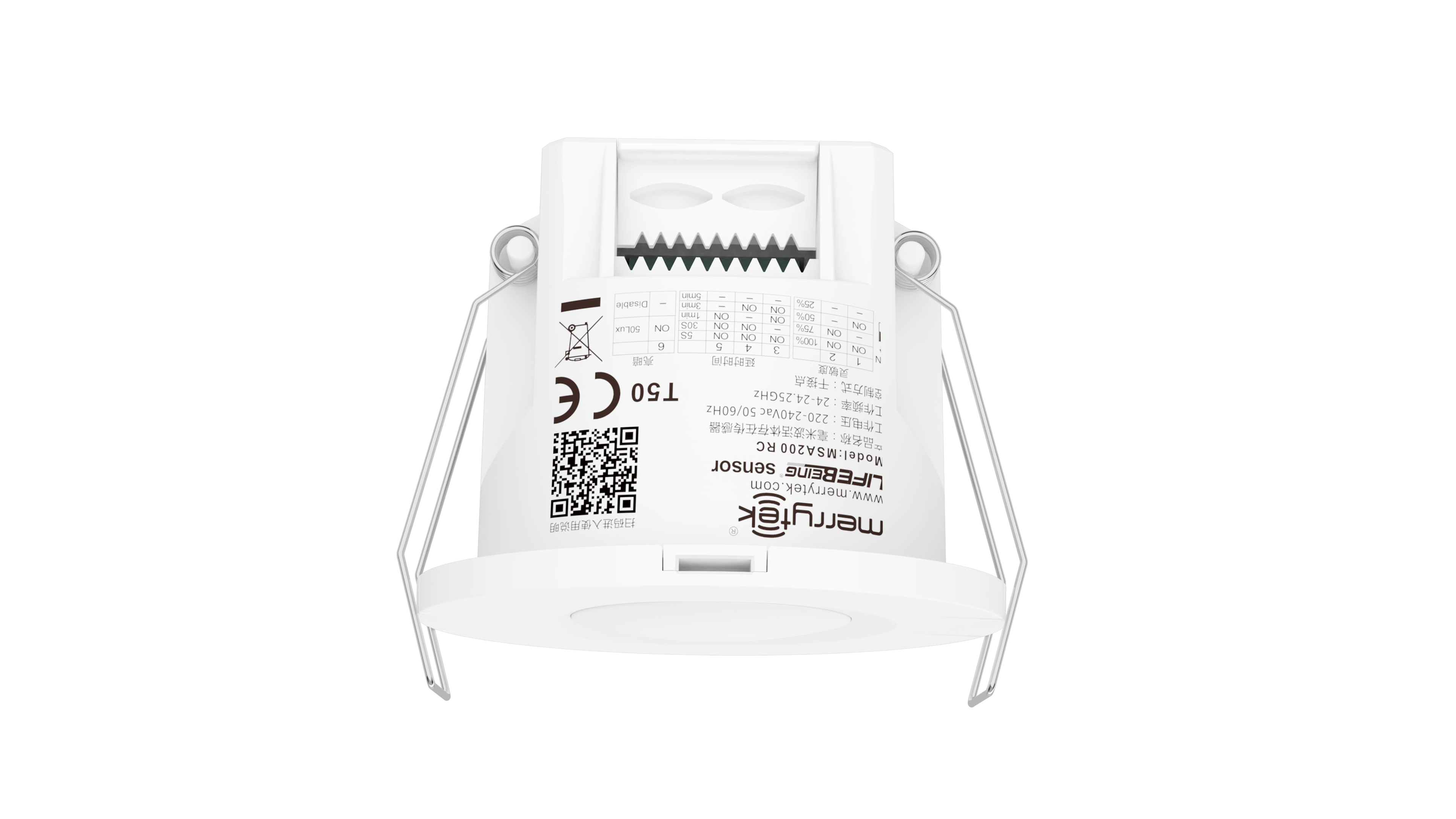
| Tempat asal | Shenzhen, Tiongkok |
|---|---|
| Nama merek | Merrytek |
| Sertifikasi | CE, UKCA |
| Nomor model | MSA200RC |
| Kuantitas min Order | 100 buah |
| Harga | Dapat dinegosiasikan |
| Kemasan rincian | Kotak berwarna + K=K karton |
| Waktu pengiriman | 1, sampel dan pesanan kecil: Dalam 5 hari kerja setelah menerima pembayaran Anda. 2, pesanan curah: |
| Syarat-syarat pembayaran | T/T |
| Menyediakan kemampuan | 10000 PC/bulan |
Detail produk
| Tegangan kerja | 220-240Vac 50Hz | Modus kerja | TIDAK ADA kontak dan kontak NC |
|---|---|---|---|
| Ketinggian Pemasangan | 2,5-4,0m | Seumur hidup | Garansi 5 tahun @ Ta 230V beban penuh |
| Versi | Detektor hunian | Jenis Beban | Resistif, tegangan≤36Vdc, arus: maks 50mA |
| Frekuensi Kerja | 24GHZ-24.25GHz | Peringkat IP | IP20 |
| Menyoroti | Detektor hunian 24GHz dengan input AC,Sensor detektor kehadiran kontak NO,Sensor hunian kontak NC |
||
Deskripsi Produk
Detektor hunian 24GHz dengan NO Contact dan NC Contact dengan AC Input
Ini tertanam dry contact occupancy detector menggunakan 24GHz gelombang milimeter teknologi radar untuk mendeteksi gerakan, gerakan ringan, dan sinyal pernapasan,memungkinkan deteksi kehadiran manusia yang akurat sambil membedakan antara target manusia dan non-manusia.
Fitur Utama
- Teknologi deteksi makhluk hidup canggih yang mampu mengidentifikasi gerakan, gerakan ringan, dan sinyal pernapasan
- Desain relay tabung reed memastikan operasi yang tenang, ideal untuk aplikasi hotel
- Ukuran instalasi kompak yang cocok untuk bangunan cerdas, hotel cerdas, kantor cerdas dan sistem deteksi kehadiran
- Radar gelombang milimeter 24-24.25GHz (band ISM) tanpa gangguan ke WiFi 5G dan tanpa penetrasi melalui dinding padat
Parameter teknis
| Kategori parameter | Parameter | Spesifikasi |
|---|---|---|
| Input/Output | Jangkauan tegangan | 220-240V AC 50HZ |
| Tegangan nominal | 220V AC | |
| Arus kerja | 50mA maksimal | |
| Kekuatan Kerja | ≤ 1W | |
| Parameter sensor | Frekuensi Kerja | 24 GHz -24,25 GHz, pita ISM |
| Kekuatan Transmisi | 5mW Max. 3dBm Max. | |
| Daerah Deteksi | 100% / 75% / 50% / 25% (ditempatkan oleh remote control MH10 atau DIP Switch) | |
| Tunggu Waktu | 5s/30s/1min/3min/5min/10min/20min (ditempatkan oleh Remote) atau 5s/30s/1min/3min/5min (ditempatkan oleh DIP) | |
| Sensor sinar siang | 50Lux/Disable (diatur oleh DIP) atau 5Lux/15Lux/30Lux/50Lux/100Lux/150Lux/Disable (diatur oleh remote control MH10) | |
| Jarak deteksi (100% area deteksi, jari-jari) | Gerakan: 4-5m (pada ketinggian 3m) Gerakan kecil: 4-5m (di ketinggian 3m) Kehadiran: 3-4m (di ketinggian 3m) | |
| Lingkungan | Suhu Kerja | 0°C...+50°C |
| Suhu penyimpanan | -40°C...80°C Kelembaban:≤85% (tidak kondensasi) | |
| Peringkat IP | IP20 | |
| Standar Sertifikat | Sertifikat | FCC/RED |
| Persyaratan Lingkungan | RoHS |
Fungsi Deteksi

Sensor ini mendeteksi berjalan manusia, gerakan ringan (seperti gerakan tubuh, memutar kepala, dan gerakan kecil lainnya), dan pernapasan untuk memungkinkan deteksi kehadiran manusia dalam keadaan tidak tidur.
- Sinyal gerak:Gerakan besar yang memicu aktivasi sensor dalam area deteksi
- Sinyal gerak ringan:Gerakan yang sangat kecil termasuk bersandar ke depan, bersandar ke belakang, berayun tubuh, menggelengkan kepala, mengetik, dan menggunakan ponsel
- Sinyal pernapasan:Deteksi pola pernapasan melalui pembesaran rongga perut dan dada
Dimensi (unit: mm)
Diagram kabel
Struktur internal
Instruksi Pemasangan
Pemasangan Flush
- Potong lubang 55mm di langit-langit
- Hapus penutup crimping menggunakan obeng kepala datar
- Sambungkan kabel ke terminal
- Pasang penutup kawat dan tekan kawat dengan aman
- Bend spring clamp ke belakang untuk mendorong ke lubang langit-langit yang telah dibuka sebelumnya
- Memastikan instalasi yang stabil dan andal
Pemasangan permukaan
- Potong dinding tipis yang disediakan untuk benang
- Atur produk pada permukaan pemasangan target dengan sekrup yang cocok
- Sambungkan kabel input ke terminal kabel dan tutup tutup erat
- Lepaskan penutup atas dengan obeng pisau datar
- Sesuaikan saklar DIP dan parameter, kemudian mengganti penutup atas
- Dorong produk ke kursi langit-langit sampai gesper mengikat dengan aman
- Untuk menghapus, masukkan obeng bilah datar ke dalam celah pemisahan dan menusuk ke bawah
- Memastikan stabilitas dan keandalan setelah instalasi
Pola Deteksi
Catatan penting:
- Jangkauan deteksi bervariasi berdasarkan ukuran orang, bahan, ketebalan penutup, dan faktor lingkungan
- Sinyal gelombang milimeter dapat menembus bahan non-logam seperti kaca dan dinding tipis, tetapi tidak dapat menembus dinding bantalan tebal atau pintu logam
Pengaturan remote control
Pengaturan remote control mendukung penyesuaian sensitivitas, konfigurasi keterlambatan, kontrol ON / OFF, fungsi reset, pengaturan gerak sensor, dan pengalihan lampu indikator.
Proses Inisialisasi
Pada pertama kali power-up, sensor masuk ke mode self-test selama 20 detik sebelum transisi ke operasi normal.sinyal gerak eksternal tidak terdeteksi dan sinyal remote control tidak diterima.
Pengaturan standar pabrik
- Daerah deteksi: 100%
- Waktu tunggu: 1 menit
- Sensor cahaya siang hari: Tidak aktif
- Lampu indikator: diaktifkan
Pengaturan Saklar DIP
Pengaturan area deteksi
| Saklar 1 | Switch 2 | Daerah Deteksi |
|---|---|---|
| Dihidupkan | Dihidupkan | 100% |
| - | Dihidupkan | 75% |
| Dihidupkan | - | 50% |
| - | - | 25% |
Tahan Pengaturan Waktu
| Saklar 3 | Saklar 4 | Saklar 5 | Tunggu Waktu |
|---|---|---|---|
| Dihidupkan | Dihidupkan | Dihidupkan | 5 detik |
| - | Dihidupkan | Dihidupkan | 30 detik |
| Dihidupkan | - | Dihidupkan | 1 menit |
| Dihidupkan | Dihidupkan | - | 3 menit |
| - | - | - | 5 menit |
Pengaturan Sensor Cahaya
| Saklar 6 | Tingkat Cahaya |
|---|---|
| Dihidupkan | 50 Lux |
| - | Menonaktifkan |
Saat diatur ke "menonaktifkan", lampu akan menyala ketika gerakan terdeteksi, terlepas dari tingkat cahaya sekitar.
Pedoman penerapan
- Pemasangan harus dilakukan oleh seorang ahli listrik yang berkualitas
- Jauhkan dari piring logam besar, kaca, dan bahan padat untuk mencegah pemicu palsu
- Hindari pemasangan di dekat sirkuit arus tinggi yang dapat mempengaruhi operasi produk
- Saat memasang beberapa unit, pastikan permukaan antena sejajar dan jaraknya lebih dari 1 m
- Hindari menghadap permukaan antena ke arah catu daya AC drive dan perangkat bertenaga tinggi
- Hindari benda yang bergetar lama di dekat produk
- Hindari cahaya yang tidak perlu menerangi jendela deteksi sensor kecerahan
- Pilih area deteksi yang tepat berdasarkan dimensi ruangan:
- 25% untuk ruangan kurang dari 2 meter (ruang mandi, ruang tamu)
- 50% untuk ruangan sekitar 3m (kamar mandi, lorong, ruang tamu)
- 75% untuk ruangan sekitar 4m (kantor kecil, ruang pertemuan, perpustakaan)
- 100% untuk ruangan sekitar 5m atau lebih (kantor besar, ruang pertemuan, perpustakaan)
- Jarak deteksi bervariasi berdasarkan kecepatan gerakan, ukuran objek, ketinggian instalasi, sudut, dan faktor lingkungan
- Spesifikasi dan parameter produk dapat dioptimalkan tanpa pemberitahuan sebelumnya
Rekomendasi Produk